At a glance
- Business
- Multi-million-pound UK ecommerce retailer with a large, complex Shopify catalogue
- Problem
- Listings crossed graphics, content, product-data and management roles, creating days of handoffs and a persistent backlog
- System
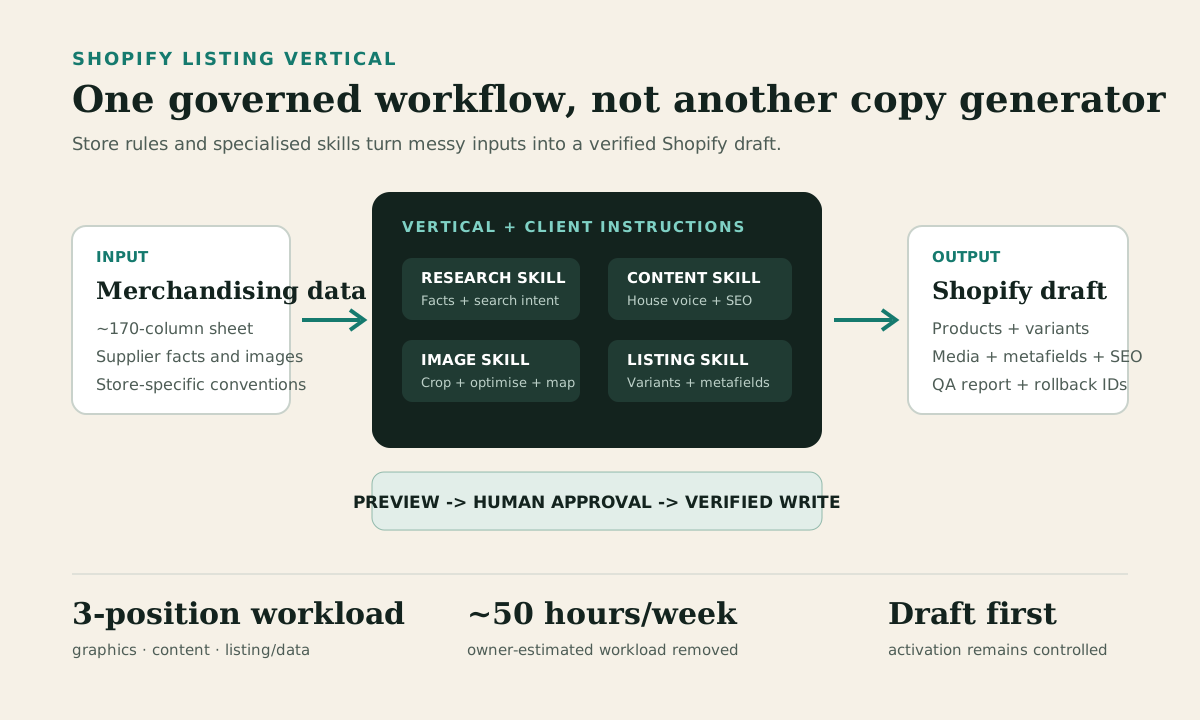
- A client-specific Shopify listing Vertical connecting research, content, image-processing and Shopify operations skills
- Team-estimated impact
- Roughly 50 hours of weekly workload removed, equivalent to three positions across graphics, content and listing/data
- Control model
- Preview, human approval, draft creation, verification and rollback records
- Client
- Anonymised UK vape and e-liquid retailer
The most impactful operational change we made
For years, product listing was one of the biggest operational headaches in the business.
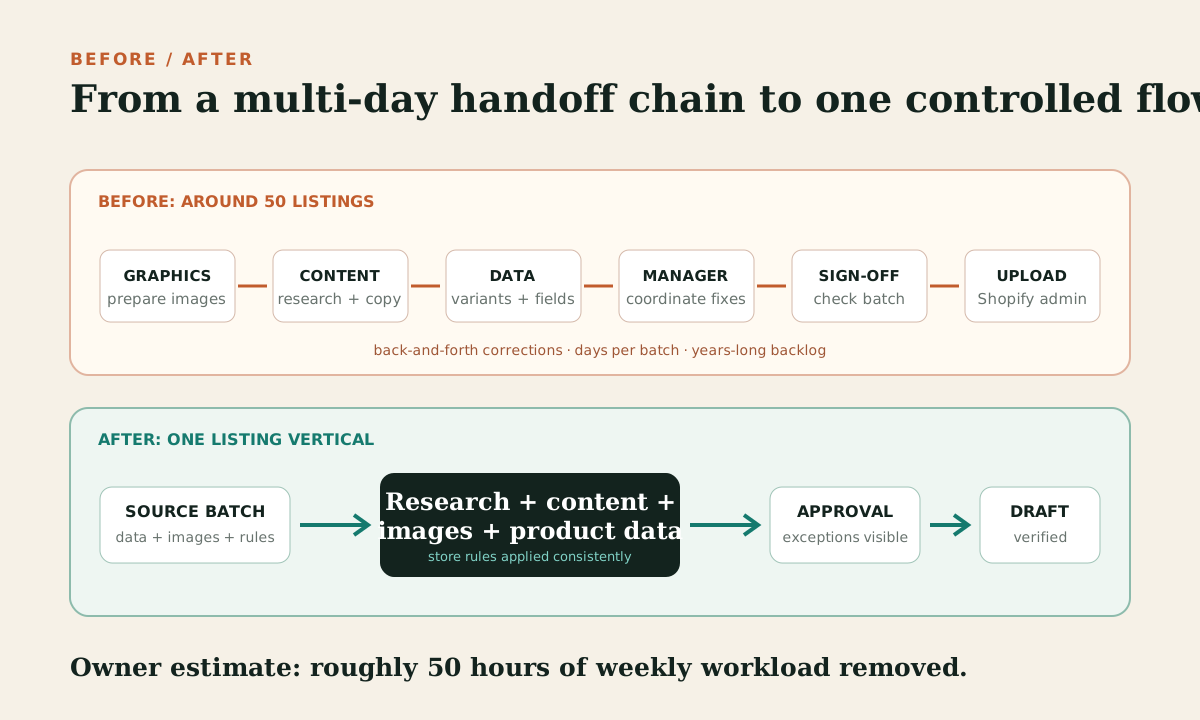
A supplier could send a new range, but turning it into a reliable Shopify catalogue entry was never one task. Each listing moved through graphics, content, product data, management, sign-off and upload.
A batch of around 50 listings could take days. Information moved backwards and forwards between people. Images arrived in inconsistent formats. Product facts needed checking. Variants had to be grouped correctly. Metafields had to match the store's taxonomy. Descriptions needed to follow the house style. A manager still had to identify gaps, return work for correction and approve the final upload.
The workload was equivalent to three positions covering graphics, content and listing/data, with management and owner sign-off around them. Because new ranges kept arriving while the existing queue was still moving, the backlog never really disappeared.
The operating team estimates that replacing this process with the listing Vertical removed roughly 50 hours of weekly workload. The team regards it as the most successful and impactful operational change made in the business.
A product listing is not a writing task
Most product-listing tools solve one narrow part of the problem. Some generate descriptions. Some import a CSV. Some resize images. Shopify can create products in bulk and its native AI features can help draft content. Those capabilities are useful, but they do not know how a specific retailer operates.
Our merchandising source contained roughly 170 columns. The relevant fields changed by product type. A vape kit, replacement coil and e-liquid range did not share the same option axis, taxonomy or metafields. Some values were plain text. Others were Shopify list fields or references to existing metaobjects. The theme added its own SEO-title suffix. Cross-sells remained human-managed. Compliance-sensitive facts could not be invented.
The real task was closer to a controlled data migration:
- Group source rows into the correct products and variants.
- Identify whether the option was colour, flavour, strength, resistance or another attribute.
- Preserve SKUs, costs, prices and inventory rules.
- Map store-specific tags, metafields and reference values.
- Research missing public facts without copying competitor content.
- Write descriptions and search metadata in the retailer's house style.
- Process and link product and variant images.
- Expose assumptions and exceptions before changing Shopify.
- Create products as drafts, verify them and retain rollback information.
A generic prompt could not carry that context reliably. The system needed explicit instructions, specialised skills and access to the right tools.
Encoding the retailer's rules in a Vertical
We built a product-listing Vertical: a repeatable operating layer that combines the retailer's instructions with task-specific skills.
The Vertical defines the sequence, the source of truth and the approval boundaries. Connected skills handle the specialist work:
- The listing skill parses the source, groups variants, validates fields and applies the correct Shopify structures.
- The research skill checks sparse or uncertain product facts against public sources and records where the information came from.
- The content skill writes the product body and SEO metadata in the established house style.
- The image skill crops, centres, compresses, names and maps images to the correct variants.
- Shopify tooling creates drafts, applies metafields and costs, uploads media and reads the result back for verification.
The store conventions are durable instructions rather than details held in one person's memory or buried in an old chat. As the team finds a new edge case, the Vertical can be refined so the next batch handles it consistently. That refinement is the difference between a one-off automation and an operating system.
The controlled workflow
1. Ingest and normalise the source
The system reads the supplied sheet, pasted table or product file and reduces it to the fields that matter. Rows with the same canonical product become variants. Unknown columns are preserved as notes rather than silently discarded.
It then validates titles, vendors, SKUs, prices, costs, inventory rules, tags, product types, images and the proposed draft status.
2. Research facts and search intent
When the source is sparse, the research step checks public product information and the current search results. It looks for factual specifications and the language buyers use, not competitor copy to reproduce.
Unsupported technical, compliance or health claims are rejected. If sources disagree, the discrepancy becomes an exception for review.
3. Write store-specific content
Descriptions follow the retailer's actual page structure and voice. The system can produce introductions, feature sections, specification tables, FAQs and internal links where the product type requires them.
SEO titles and descriptions are created separately. They account for the store theme's behaviour and use only supported product facts.
4. Process and map the images
The image pipeline centres the product, creates a square 1200 x 1200 canvas, exports WebP and compresses towards the retailer's file-size target. Filenames and alt text are generated consistently.
Variant images are linked only when the mapping is clear. An ambiguous filename is not guessed; it is surfaced for a decision.
5. Preview before writing
The preview shows each product, its variants, prices and costs, the metafields to be applied, image status, SEO metadata, assumptions and skipped fields. This is the main control point. The aim is not to make a fast mistake at scale.
6. Create a draft and verify it
Approved products are created as Shopify drafts by default. The system applies known metafields, costs and media, then reads the result back and produces a report with object IDs, issues and rollback notes. Activation remains a deliberate commercial decision.
What the workflow delivered in real batches
The system was not tested on a demonstration catalogue. It was refined through live merchandising work.
One June batch contained 27 product records and 68 processed product or variant images. A separate range expansion created six draft products with 18 variants, 13 metafields per product, search metadata and house-style descriptions.
An image-repair run found 15 active products with no images. It processed 15 supplied images into 1200 x 1200 WebP files under the store's 80KB target, uploaded them, linked them to the relevant variants and verified that all 15 products now had media.
A later two-product range had 34 variants and 34 one-to-one variant images. The pipeline processed the images to roughly 47-54KB each, created the variants and metadata, and produced about 3,000 words of structured product content. It also caught inconsistent supplied facts before the products were activated.
These examples test different failure points: range expansion, high variant counts, missing media, reference metafields, source-data errors and long-form copy. Each batch improved the instructions used by the next.
Where human judgement remains
The workflow is highly automated, but it is not presented as unsupervised. People remain responsible for:
- Resolving genuinely ambiguous source data.
- Approving new taxonomy or metafield values.
- Checking disputed technical or regulated claims.
- Deciding whether missing costs or images block a draft.
- Reviewing exceptions and commercially sensitive pricing.
- Approving activation.
The goal was not to remove judgement. It was to stop skilled people spending their days moving the same information between documents and Shopify fields.
The result: capacity, consistency and a cleared bottleneck
The operating team estimates the system removed roughly 50 hours of weekly workload previously spread across graphics, content and listing/data roles.
That figure is an internal operating estimate, not a time-and-motion study, and it should be read in the context of the old process. Listing work consumed multiple hours per day across several people. A batch of around 50 products could occupy the team for days, with corrections and sign-off extending the elapsed time. The queue had been a recurring bottleneck for years.
The change was larger than a labour saving:
- Product data followed one store-specific standard.
- Images were processed consistently.
- Exceptions became visible before upload.
- New ranges could start as controlled drafts rather than incomplete live products.
- Reports and rollback information made the work auditable.
- Improvements accumulated instead of disappearing when staff changed.
The released capacity could be used on decisions that still needed an operator: range selection, pricing, merchandising and growth.
What other catalogue teams can take from this
The reusable lesson is not to automate the most visible step first. Start by mapping the whole route from source data to an approved live listing. Identify every handoff, store rule, exception and irreversible action. Then separate the workflow into deterministic work, research work and operator decisions.
For a complex Shopify catalogue, the system should understand the store before it writes to the store. That is what turned this project from a description generator into the most impactful operational change in the business.
Shopify product listing automation: common questions
Can Shopify product listings be automated?
Yes, when the retailer's source data, catalogue rules and approval boundaries are explicit. The repeatable work can cover product grouping, variants, content, images, metafields, SEO fields, draft creation and verification. Ambiguous data and activation should still be reviewed by an operator.
Why is a CSV importer not enough for a complex catalogue?
A CSV can move flat values into fields. It does not decide how supplier rows should become products and variants, resolve Shopify reference fields, research missing facts, process and map images, apply house style or explain exceptions before writing.
What should remain human-approved?
New taxonomy, disputed product facts, sensitive pricing, unresolved costs or images, exceptions and activation. The system should remove repetitive assembly work without hiding decisions that can damage the catalogue.
Method note
This case is based on the retailer's operating instructions, live Shopify batch reports and operating-team testimony. Batch figures come from saved creation, media and QA artifacts. The weekly time saving is the team's estimate based on the workload previously carried across the graphics, content and listing/data functions. The retailer is anonymised; product names, IDs, domains, costs and staff identities are excluded.
NEXT STEP / HOLLOW POINT
Turn a permanent listing queue into a controlled system.
Hollowpoint connects catalogue rules, research, content, images and Shopify operations in one accountable workflow.