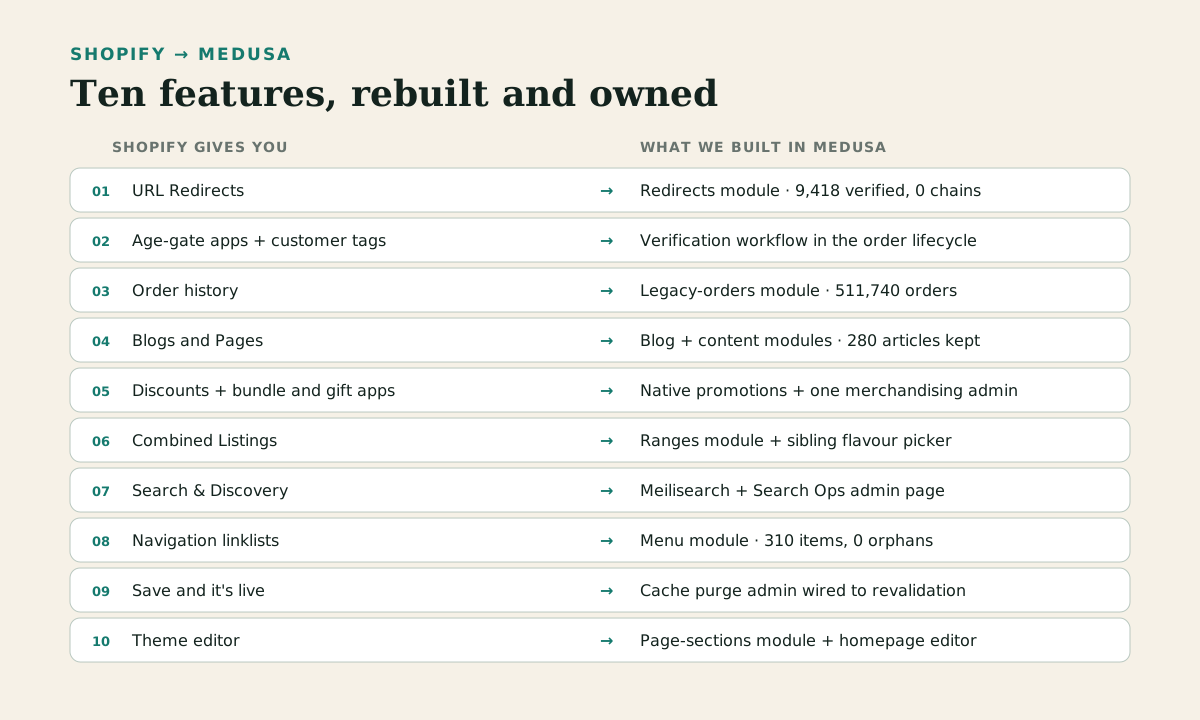
Why bother at all? The short answer is Shopify banned the store's entire category worldwide. The migration was already under way when that happened, which turned it from strategy into necessity. Restricted categories can't rent their platform. So: own the stack, rebuild what you use. If you want the commercial version of that argument, the Medusa.js agency page is the decision surface.
Everything below shipped. The numbers are from our run logs and verification reports, not projections.
1. URL redirects, at migration scale
Shopify gives you: URL Redirects, a simple old-path-to-new-path table.
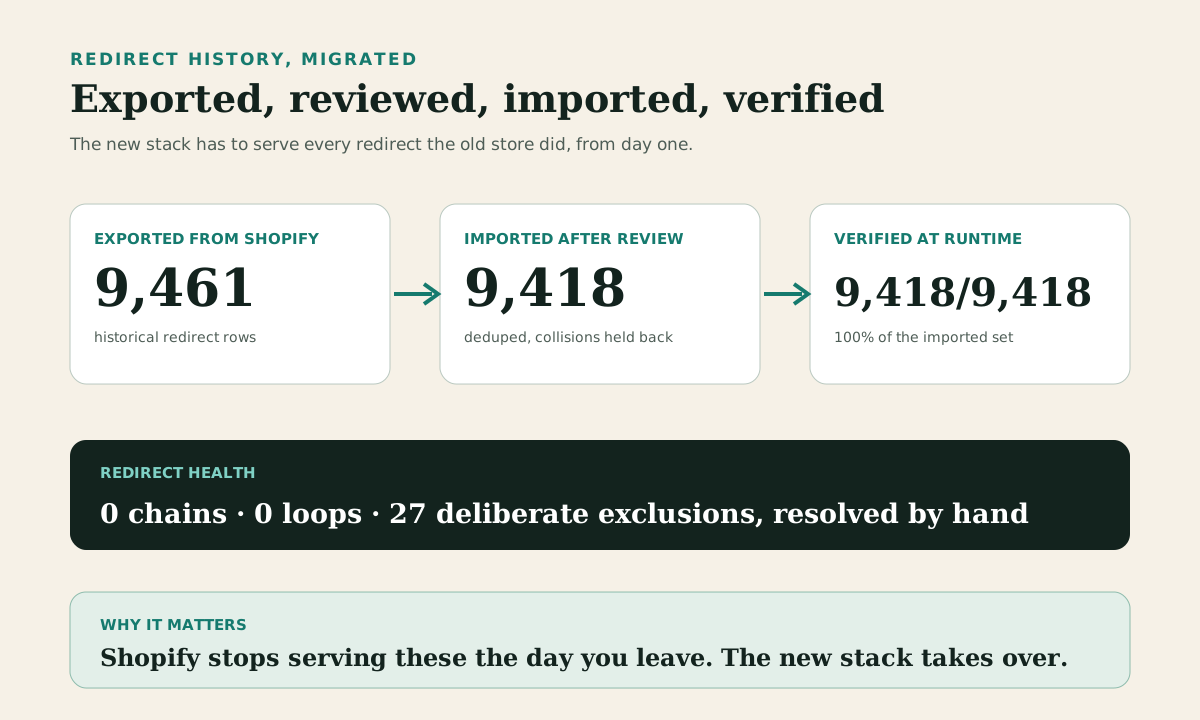
Why it matters more than you think: a decade-old store accumulates thousands of these, and they're the thread your SEO hangs by. Ours had 9,461. When you leave the platform, Shopify stops serving them, so the new stack has to take over every single one on day one.
What we built: a redirects module with bulk import and an admin verification report. 9,461 exported, 9,418 imported after review and dedupe, then verified 9,418 for 9,418 with zero chains and zero loops. The remaining 27 were collisions and external targets, resolved by hand. We also mapped all 2,938 live URLs one-to-one so most pages never redirect at all, they just keep their address. Full method in the URL parity case study.
Gotcha: redirect priority against real routes. Get the middleware order wrong and a redirect can shadow a live page. Test with a stratified sample, not the top ten URLs.
2. Age verification as a first-class flow
Shopify gives you: third-party age-gate apps bolted onto checkout, with verification status living in customer tags.
What we built: age verification as part of the order lifecycle. Verified status is a real field, imported for 52,559 existing customers so nobody verifies twice. New orders route through a verification workflow before fulfilment, repeat customers with a passed check skip it, and fulfilment is blocked until status clears. The provider integration is ours, so when regulation changes (and in this category it always changes) we change code, not apps.
Gotcha: the migration is the easy half. Decide what happens to orders that fail verification, before launch, with the operations team in the room.
3. Order history without polluting the new engine
Shopify gives you: your orders, forever, in one system.
The trap: importing ten years of orders as native orders in a new platform contaminates analytics, tax logic and fulfilment queues with history that should be read-only.
What we built: a dedicated legacy-orders module. 511,740 historical orders and 1,623,539 line items imported into their own tables, with product snapshots preserved even where the product no longer exists (668,824 archived-product lines). Customers see their full history in their account; the live order engine starts clean. Import ran with zero errors in the logs, and 497,131 orders matched to their customer accounts automatically.
Gotcha: 43,114 line items referenced SKUs that no longer exist anywhere. Decide the display rule for those up front.
4. Blogs and content pages
Shopify gives you: Blogs, Pages, and a theme that renders them.
What we built: a blog module (blogs, articles, per-article SEO fields), a content module for the structured page content that lived in metaobjects, and admin pages for both. 280 published articles moved at their original URLs with 1,026 images re-hosted to our own storage. Collection pages carry 778 structured content blocks and 676 FAQs, reconciled against the source with a zero-delta check.
Gotcha: content hides everywhere in Shopify. Metafields, metaobjects, theme settings, apps. The export you think is complete never is; verify against the rendered site, not the admin.
5. Promotions and deal merchandising in one place
Shopify gives you: native discounts plus, in practice, two or three paid apps to do bundles, free gifts and multibuy properly.
What we built: the store's ten live discount mechanics transcribed into the native MedusaJS promotions engine (buy X get Y included), then one merchandising admin that unifies what used to be three apps: deal badges (273 products carry them), frequently-bought-together, missed-offer nudges in the cart, free-gift logic and tiered offers.
Gotcha: app subscriptions disappear from your costs, but their logic doesn't disappear from your business. Inventory every live offer before you migrate. The one you miss will be the one the owner's best customers use.
6. Combined listings and product ranges
Shopify gives you: Combined Listings for presenting sibling products as one, if you're on the right plan and your data fits its shape.
What we built: a ranges module. Ranges group sibling products, seed themselves from existing metafields with a preview-and-apply step, and drive a flavour picker on product pages that carries the customer's chosen strength between siblings. That last detail is the kind of thing no generic platform feature ever quite does, and it's exactly what customers notice.
Gotcha: this is where your store's personality lives. Budget design time here, not just engineering time.
7. Search that respects merchandising
Shopify gives you: Search & Discovery, decent and closed.
What we built: Meilisearch, with product indexing, faceted filtering on the fields the store actually filters by, a fuzzy layer for typos, and a Search Ops admin page reporting index parity, freshness and settings drift, so staff can see search is healthy rather than assume it.
Gotcha: index size. Full product metadata blew past the index document limits fast. Index what search needs, hydrate the rest at render.
8. Navigation menus staff can edit
Shopify gives you: linklists and a theme editor.
What we built: a menu module with nested items and an admin tree editor. The main menu imported from the live store: 310 items, three levels deep, zero orphans. Sounds trivial. It's the difference between "staff update the header themselves" and "staff file a ticket to change a link", and staff-operability is most of what keeps a custom stack cheap to run.
Gotcha: links point at handles, and handles change during migration. Import navigation last, verify every link resolves.
9. Instant publish, the thing headless famously gets wrong
Shopify gives you: save, refresh, it's live.
The headless problem: aggressive caching makes storefronts fast and makes content updates invisible. The classic failure is a merchandiser changing a homepage banner and waiting an hour for the cache.
What we built: an admin cache page wired to the storefront's revalidation API over a shared secret, with a registry of purgeable cache tags (homepage sections, collection ordering, content blocks). Staff edit, press purge, see it live. We verified the full round trip: edit a homepage section, purge, confirm the change publicly visible.
Gotcha: fail closed. If the secret or endpoint is missing, the purge button should say so honestly rather than pretend.
10. The homepage as staff-editable sections
Shopify gives you: the theme editor, the feature merchants would riot without.
What we built: a page-sections module and homepage editor: nine section types (hero, deals, collection carousels, trust strip, FAQs and so on) as structured, orderable content with an idempotent seed. The storefront renders whatever staff arrange. No developer in the loop for a homepage change, which is the bar any replatform has to clear before operations people will accept it.
Gotcha: build the editor for the sections the store has, not a general page builder. Generality is where these projects go to die.
Three more that deserve honesty
Transactional email is rebuilt as a custom Resend provider with the four order emails (confirmation, cancellation, dispatch, refund) matched to the store's design, in the store's currency and tax format, with 315 tests passing. GDPR tooling handles export and erasure across both native customers and the legacy-order module, with erasure implemented as pseudonymisation because UK VAT law requires six years of financial records. And payments integrate a high-risk gateway, Klarna and the store's age-verification provider into one checkout.
We built all three. We'd still tell a prospective client which parts of any stack have taken live production fire and which are freshly shipped, because that's the difference between a build log and a brochure.
What this actually costs
Honest calibration, since the "ten minute migration" framing refuses to die: this was months of engineering. The data and URL work dominated, the staff-facing admin was the hidden second half, and the storefront itself was the easy part. You're not paying to re-implement Shopify. You're paying to own the 20% of it your business actually uses, shaped to how you operate.
Whether that's worth it depends on the store. Most merchants should stay on Shopify, genuinely. The maths changes when the platform can evict your category with two weeks' notice, when app stacking has made operations painful at scale, or when the features you need don't exist to rent. That's the decision framework we wrote up here.
The part that isn't about features
Every item above has one property Shopify can never offer: nobody can take it away. No acceptable use policy, no app sunset, no plan-tier gate. For a regulated-category store, that's not a technical preference. After July, it's the whole argument.
If you're weighing this up for your own store, our MedusaJS development page covers how we run these builds, and the migration page covers the move itself. Bring us a hard question about your stack. If MedusaJS is the wrong answer for you, that's a shorter conversation, and we've had it with people before.
NEXT STEP / HOLLOW POINT
Weighing a MedusaJS build for your store?
Hollow Point designs, builds and runs MedusaJS stacks for stores that need to own their platform.