If you are still deciding whether to leave Shopify at all, start with what the vape ban means and what your options are. This article assumes you have made that call and picked Medusa.js. It is about the migration itself.
Why Medusa.js and not something else
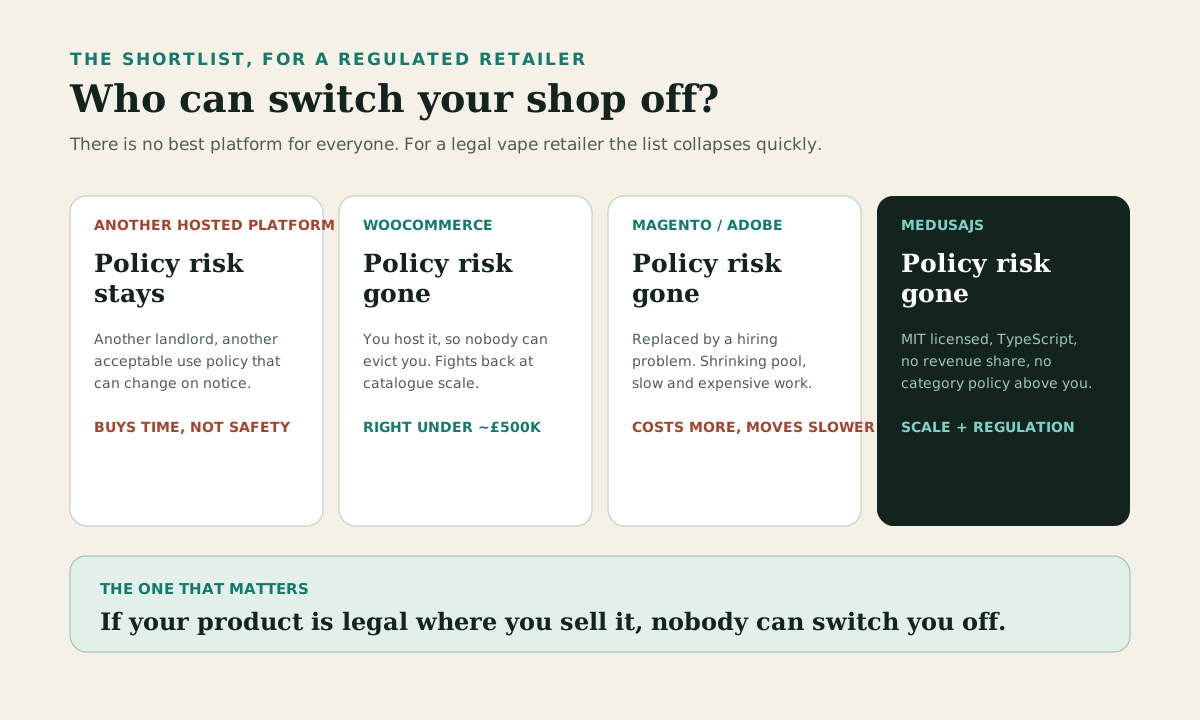
There is no platform that is best for everyone, and any agency telling you otherwise is describing its own service list. But for a vape retailer specifically, the shortlist collapses quickly.
| Option | Who can switch you off | Cost model | Best fit |
|---|---|---|---|
| Another hosted platform | The platform, on notice | Subscription plus apps plus fees | Nobody in a category regulators are watching |
| WooCommerce (self-hosted) | Nobody | Hosting plus development | Simple catalogues, roughly under £500k |
| Magento / Adobe Commerce | Nobody | High development cost, scarce skills | Enterprises already invested in it |
| MedusaJS | Nobody | Hosting plus development, no revenue share | Catalogue scale plus regulated checkout |
Another hosted platform means another landlord. BigCommerce, Wix, Squarespace and Shopify all reserve the right to decide what they will support. You can read their acceptable use policies today and they might say something different next year, on two weeks' notice, exactly as Shopify did. If regulator pressure is what moved Shopify, the same pressure reaches every hosted platform eventually. Moving from one to another buys you time, not safety.
WooCommerce removes the policy risk because you host it. Under about £500k with a simple catalogue it is usually the right answer, and we will say so to your face. Above that, and particularly with a catalogue in the thousands, you start fighting WordPress rather than working with it.
Magento removes the policy risk too, and replaces it with a hiring problem. Adobe Commerce developers are expensive, the pool is shrinking, and the work is slow. We have quoted against Magento shops enough times to know how the numbers land.
Medusa.js is different in one specific way that matters more than any feature comparison. It is a commerce engine you own, written in TypeScript, that you run wherever you like. MIT licensed. No revenue share, no per-transaction platform fee, no category policy, no app store to be evicted from. If your product is legal where you sell it, nobody can switch you off.
That is the whole argument. Everything below is about doing it without breaking your business on the way.
What you stop paying for, and what you start owning
Shopify's cost is not the subscription. It is the layer of apps you bolt on to make it behave, plus the transaction fee if you are not on Shopify Payments, plus the workarounds you build because an app almost does what you need.
On the migration we ran, the Shopify store depended on apps for age verification, discount stacking, checkout blocks, multibuy offers, product relations, loyalty, reviews, search and navigation. Some of them cost more per month than the plan did. All of them held data we had to get back out.
After the move, those became modules in a codebase we control. The feature-by-feature list of what we rebuilt is a separate article, because it is long. The short version: promotions, merchandising, product relations, navigation, blog, media, redirects and age verification all became things the team can change without asking anyone's permission or waiting for an app developer's roadmap.
The part nobody quotes on is the compliance risk. On Shopify, a policy change ends your business with an email. On a stack you own, it cannot happen. There is no line item for that and it is probably the most valuable thing in the whole project.
Be honest with yourself about the other side of the trade, though. You now own uptime, patching, backups and hosting. That is a real responsibility, and it is why the hosting question below matters.
SEO parity is the whole migration
This is the section most migration guides skip, and it is the one that decides whether you still have a business in six months.
A replatform is the single highest-risk thing you can do to organic traffic. You are changing every template, every URL structure, every bit of internal linking and your entire technical setup at once. Do it carelessly and you lose rankings you spent a decade building, at exactly the moment you have no margin for lost revenue.
The goal is parity. Not improvement, not a redesign, not "while we're in there". Parity. You want Google to see the same site at the same addresses with the same content, served faster. Save your redesign for three months after cutover when the data says you are stable.
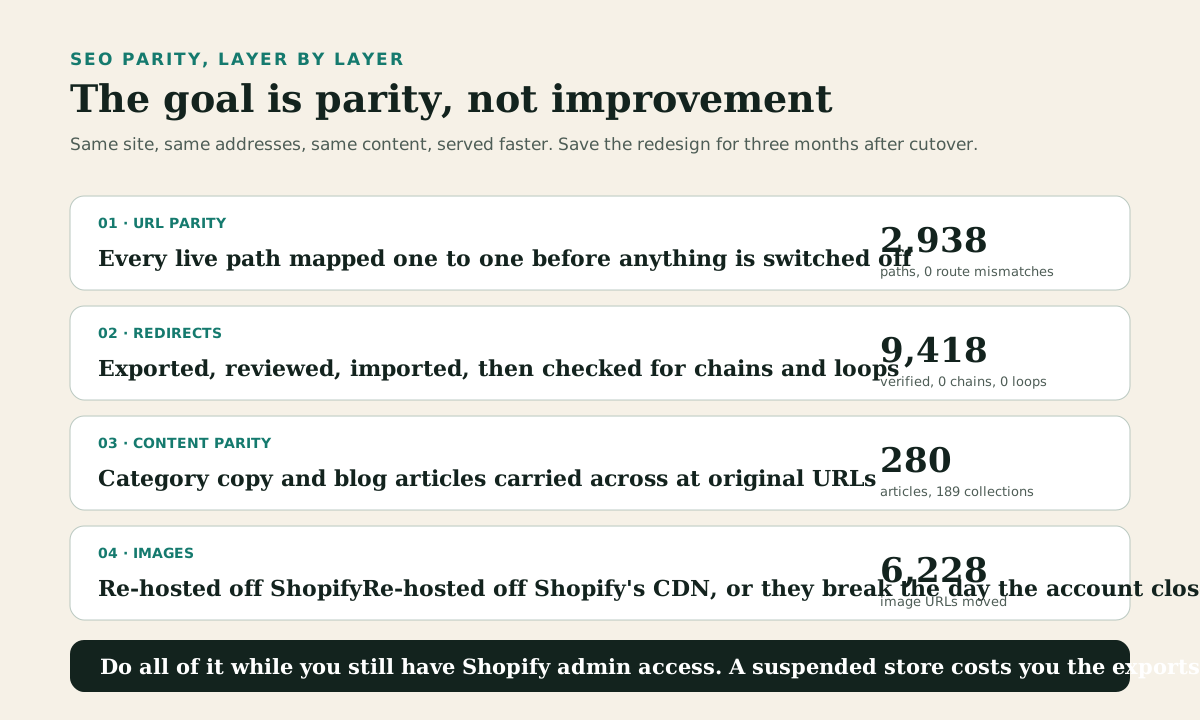
URL parity comes first. Export every live path from Shopify and map it one to one against what the new store will serve. Products, collections, blog articles, pages, policy pages, tag pages, the lot. On our migration that was 2,938 current Shopify paths against 2,938 expected Medusa paths, with zero route mismatches. Getting there took four supplemental gap exports and enrichment from the live sitemap, because the first export is never complete. It never is. Budget for that.
Redirects come second, and they are bigger than you think. Shopify accumulates redirects quietly for years, from every renamed product and restructured collection. That store had 9,461 of them. We reviewed and cleaned them down to 9,418 active redirects, imported those, then verified 9,418 out of 9,418 matched, with zero missing, zero mismatched, zero extra, zero chains and zero loops. Twenty-seven were deliberately excluded: 25 source collisions and 2 pointing off-site.
Chains are the specific thing to watch. Old URL to new URL is fine. Old URL to another old URL to a new URL bleeds authority and eventually stops being followed. If your redirect import does not check for chains and loops, it is not finished.
Content parity third. Thin category pages rank worse, and category copy is the easiest thing to lose in a migration because it usually lives in metafields or an app rather than the product data. We moved 189 populated collections carrying 778 content blocks and 676 FAQs, then ran a reconciliation pass over 165 collections that caught another 352 block changes. For the blog, 280 published articles at their original URLs with per-article SEO fields carried across, and 1,026 images re-hosted.
Images matter more than people expect. If your new store still serves images from Shopify's CDN, you have not really left, and the day your account closes every image on the site breaks. We moved 6,228 product image URLs to our own storage and rewrote 1,322 thumbnails and 3,657 image rows across 2,461 products until zero in-scope Shopify CDN references remained.
Timing last. Point the domain only when redirects are verified and payments are live. Doing it the other way round is what turns a planned migration into a traffic loss. And do all of this while you still have normal Shopify admin access. A suspended store can cost you the exports, and there is no way to get them back afterwards.
One honesty note, because we will not claim what we cannot prove. That store is pre-cutover as we write this. The URL parity and redirect verification are real, measured and complete. Preserved rankings are not something anyone can promise you before cutover, and we are not going to. Method is in the URL parity case study.
Payments, age checks and the integrations nobody joins up
For a regulated retailer this is where most platform comparisons quietly fall apart. The features all exist somewhere. Getting them to work together is the job.
Payments follow the merchant, not the platform. This is the single most misunderstood thing about migrating a high-risk store. Your acquirer underwrites your business, your category and your chargeback history. Changing platform does not make an acquirer more comfortable, and it does not reset anything. High-risk underwriting runs to weeks, so applications go in before the build starts, not after.
The good news is that you can keep the stack you already trust. On our build, CyberSource stayed the processor and Klarna stayed as a hosted payment page. They stopped being Shopify apps and became payment providers the Medusa engine talks to directly. Same for the warehouse: Linnworks and ShipStation kept running the operation, connected as real integrations rather than through an app's assumptions about how your fulfilment works.
Age verification deserves its own paragraph because it is the one that gets treated as a bolt-on and should not be. On Shopify it is an app that draws a modal. In a proper build it is a first-class flow: verification status stored against the customer, checked at checkout, carried on the order, and gating fulfilment. Ours is built around 1account. The detail that matters commercially is that we imported 52,559 completed age verifications, so returning customers are not asked to verify again on a website that already looks unfamiliar to them. Ask any migration vendor how they handle that. Most have not thought about it.
We should be precise about what is packaged and what is not, because vague claims here are how people get sold vapourware.
| Capability | On Shopify | On Medusa | Status today |
|---|---|---|---|
| URL redirects | Built-in table | Redirects module | Public on GitHub, MIT |
| Navigation menus | Linklists | Navigation module | Public on GitHub, MIT |
| Media library | Files | Media library module | Public on GitHub, MIT |
| Email marketing | Klaviyo app | Klaviyo integration | Public on GitHub, MIT |
| Staff permissions | Shopify staff roles | Staff permissions plugin | Public on GitHub, MIT |
| Age verification | 1account app | 1account, first-class checkout flow | Production integration, plugin planned |
| Payments | CyberSource and Klarna apps | Payment providers on the engine | Production integration |
| Warehouse and fulfilment | Linnworks and ShipStation apps | Direct integrations | Production integration |
| Reviews and loyalty | Lipscore and Loyoly apps | Client-specific integrations | Production integration, not packaged |
The reason this combination is hard to buy elsewhere is not that any one piece is exotic. It is that a UK vape retailer needs high-risk payments, hard age gating, a real warehouse system and review and loyalty data all working together, and most agencies have done one or two of those.
TypeScript, modules, and why the work costs less than you think
Medusa.js is TypeScript end to end. The backend, the Admin, the storefront if you use Next.js. That has three practical consequences for a retailer, and none of them are about developer taste.
Hiring is easier. TypeScript and React developers are the largest pool in the market. Adobe Commerce specialists are not, and they price accordingly. If we disappeared tomorrow, you could hire someone to take over a Medusa build. That is a fair question to ask any agency and you should ask it.
The work is faster because the system is modular. Commerce features are separate modules linked together, so adding a capability means adding a module rather than fighting inherited behaviour. Changing how promotions work does not risk breaking fulfilment. On Shopify the equivalent is finding an app, hoping it composes with your other four apps, and living with whatever it does.
Nothing is hidden. When something behaves oddly you read the code. On a hosted platform you open a support ticket and wait. During a migration, when you are diagnosing why one collection route resolves differently from the other 206, that difference is worth a lot.
The honest counterweight: Medusa gives you an engine and an Admin, not a theme store. There is real work in the storefront that Shopify would have given you for free. That work is where a chunk of the budget goes, and anyone who tells you otherwise is quoting you for something they are not going to build.
Self-host or Medusa Cloud
You have two sensible hosting routes and the choice is mostly about who you want carrying the pager.
Self-hosting gives you total control and the lowest running cost. You need Postgres, Redis, somewhere to run Node and somewhere to put files. If you have technical people or a partner on retainer, this is straightforward and predictable.
Medusa Cloud is the hosted route from the company that makes Medusa. You get managed infrastructure, deployment tooling and support, with an enterprise tier for larger operations. It is a good fit when you want the ownership of open source without becoming an infrastructure team, and it removes the most common objection boards raise about self-hosted commerce.
The important difference from Shopify holds either way: it is your code and your data. If Medusa Cloud ever stopped suiting you, you would move the same application somewhere else. You would not be rebuilding your shop.
What the migration actually looks like, in order
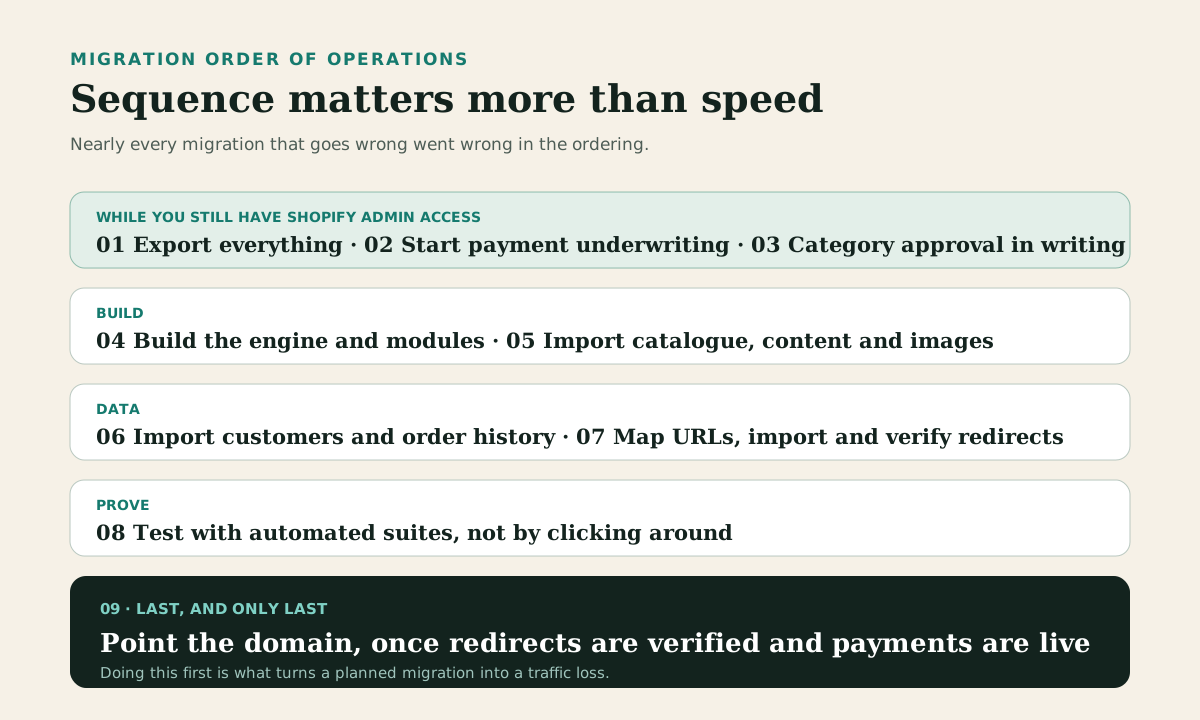
Sequence matters more than speed here. Nearly every migration that goes wrong went wrong in the ordering.
- Export everything while you still have admin access. Products, variants, metafields, metaobjects, collections, customers, orders, redirects, blog content, pages, theme files. All of it, early. The store we moved had 9,187 products, 207 collections, 52 product and 22 collection metafield definitions, 17 metaobject types and 9,461 redirects. You will not know what you need until later, and by then you may not be able to get it.
- Start payment underwriting. Before the build. Weeks, not days.
- Get category approval in writing from anyone you are relying on, from someone in compliance rather than sales. If they will not put it in writing, treat that as the answer.
- Build the engine and the modules. This is the bulk of the work and where your feature list gets rebuilt properly rather than approximated.
- Import catalogue, content and images. Ours came in as 2,933 products, 207 collections mapped to categories with metafields ported one to one, 32,294 category memberships with zero failures, and every image re-hosted off Shopify's CDN.
- Import customers and order history. This is the big one. 260,880 customers with 206,750 addresses, then 511,740 orders and 1,623,539 line items across a four and a half hour run, with zero errors. Order history lives in dedicated tables rather than being replayed through the live order system, so ten years of Shopify history does not contaminate your new fulfilment logic.
- Map URLs and import redirects, then verify every single one for chains and loops.
- Test properly. Automated suites, not clicking around. We were running 233 backend and 6 storefront tests on the main build, with 312 unit tests on the notifications work.
- Point the domain last, once redirects are verified and payments are live.
| Store profile | Realistic timeline | What drives it |
|---|---|---|
| Small catalogue, no unusual requirements | 6 to 10 weeks | Storefront build is most of the work |
| Mid-size catalogue, standard checkout | 2 to 3 months | Catalogue and content parity |
| Thousands of products, years of order history | 3 to 6 months | Customer and order import, redirect verification |
| Regulated checkout on top of the above | Add 3 to 6 weeks | High-risk underwriting, which runs in sequence |
What it costs
We do not publish a build price band. Catalogue size is a poor predictor of migration cost: what moves the number is data quality, integration count, payments, compliance obligations and the size of the URL surface that has to survive cutover. Two vape retailers with the same product count can be a straightforward replatform and a multi-quarter systems project. The paid assessment establishes which one you are before a build is committed, and is credited against the build if it proceeds. Ongoing RUN engagements start from £3k per month, usually in the £3k to £8k range depending on capacity, response time and access.
A build looks like a lot next to a Shopify plan until you total up what you are already paying. Subscription, apps, transaction fees on non-Shopify Payments, the agency retainer, and the cost of every change you wanted and could not have. Most vape retailers we speak to are spending more than they think, and getting less flexibility than they assume.
Set against that, the numbers that do not appear on any invoice: no revenue share, no platform fee that scales with your success, and no possibility of a policy email ending your business.
What Medusa.js is bad at
We would rather you heard this from us than found out in month two.
There is no theme store. Storefront work is a real line in the budget, not a template you pick on a Tuesday.
There is no app store, so anything you cannot find as a Medusa plugin gets built. That is often better than the app you would have installed, and it is also more expensive up front.
You own hosting and uptime. Managed hosting removes most of that, and none of it is nothing.
The community is smaller than Shopify's or WooCommerce's. It is growing quickly and the documentation is unusually good, but you will occasionally be the first person to hit a given problem.
And if you are a small shop with a simple catalogue and no unusual requirements, Medusa is probably more platform than you need. Self-hosted WooCommerce would get you off Shopify for a fraction of the cost. We would tell you that on the call.
Common questions
How long does a Shopify to MedusaJS migration take? Most small to mid-size catalogues run two to three months. A store with thousands of products, years of order history and regulated checkout requirements takes longer, because customer and order import, redirect verification and payment underwriting all take real time and some of them run in sequence rather than in parallel.
Will I lose my Google rankings? Not if every live URL is either preserved or redirected to its exact equivalent before the old store is switched off. That work has to happen while you still control the Shopify store. On our migration that meant 2,938 URLs mapped one to one and 9,418 redirects imported and verified with zero chains and zero loops. Nobody can honestly promise you a ranking outcome in advance, and you should be sceptical of anyone who does.
Can I keep CyberSource, Klarna, Linnworks and ShipStation? Yes, on a stack you own. They stop being Shopify apps and become integrations the commerce engine talks to directly. Payment underwriting still follows the merchant rather than the platform, so applications go in early regardless.
Does Medusa handle age verification? Not out of the box, and no commerce platform does it properly out of the box. It gets built as a first-class flow: verification stored against the customer, enforced at checkout, carried on the order and gating fulfilment. Existing verifications can be imported so returning customers are not asked twice. We carried 52,559 across.
Is MedusaJS free? The software is MIT licensed and free to use, with no revenue share or transaction fee. You pay for hosting and for development. Medusa Cloud is a paid managed option if you would rather not run infrastructure yourself.
MedusaJS vs Shopify: which is better for a vape shop? For a legal vape retailer in 2026, Shopify is not an option at all, because the ban is categorical and worldwide. Among the platforms that remain, Medusa suits retailers with real catalogue complexity, regulated checkout requirements and a need to own their own compliance risk. Smaller shops with straightforward catalogues are usually better served by self-hosted WooCommerce.
Can I import my Shopify order history? Yes, and you should. Customers expect to see what they bought. The technique that matters is keeping legacy orders in dedicated tables rather than replaying them through the live order system, so historical data cannot interfere with current fulfilment. We imported 511,740 orders and 1,623,539 line items that way.
What about my blog and collection content? It comes across, and it needs to, because that content is a large part of why your category pages rank. Blog articles keep their original URLs. We migrated 280 published articles with their SEO fields intact and re-hosted 1,026 images.
What is Medusa Cloud and do I need it? It is the managed hosting product from the Medusa team, with an enterprise tier. You do not need it, and it is a good answer if you want open-source ownership without running infrastructure. Either way the code and data stay yours.
Is this only relevant to vape retailers? No. The vape ban is what made it urgent, but the same reasoning applies to any category a hosted platform might decide it no longer wants: CBD, nicotine pouches, firearms accessories, adult products, supplements. The lesson is not about vapes. It is about who gets to decide whether your shop stays open.
Where we fit
We are an official Medusa Expert, and we have just taken a £4.5M UK vape retailer through this exact migration. The numbers in this article come from that build, not from a pitch deck. Five of the plugins we wrote along the way are public on GitHub under MIT, so you can read the code before you talk to us.
If you want the detail, there is a write-up of the URL parity work and the migration itself. The commercial version of the argument lives on the migration service page, and the regulated-category version on high-risk ecommerce.
If you are running a regulated store and need a straight answer about whether Medusa is right for you, get in touch. If the honest answer is WooCommerce, we will say so.