The measured result
- Client
 Vape Online Store · UK retail and wholesale · Shopify
- Starting point
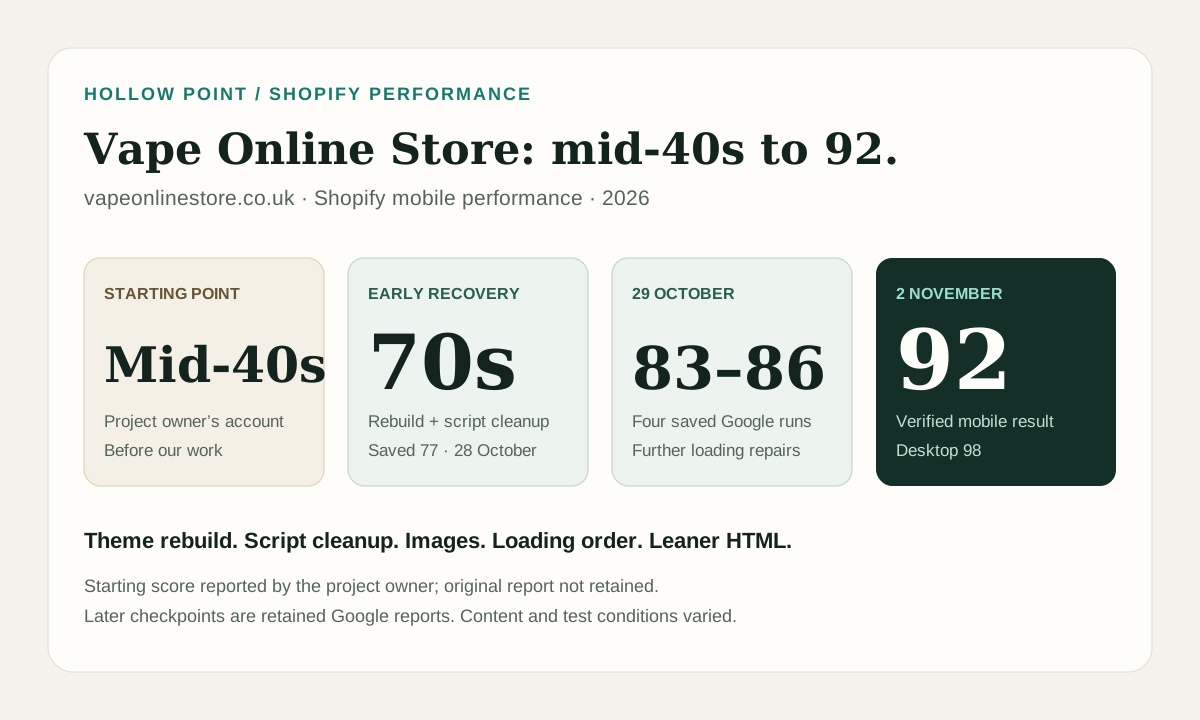
- Mid-40s mobile performance, reported by the project owner
- Mobile performance
- 92 in Google PageSpeed Insights, 2 November 2026
- Desktop performance
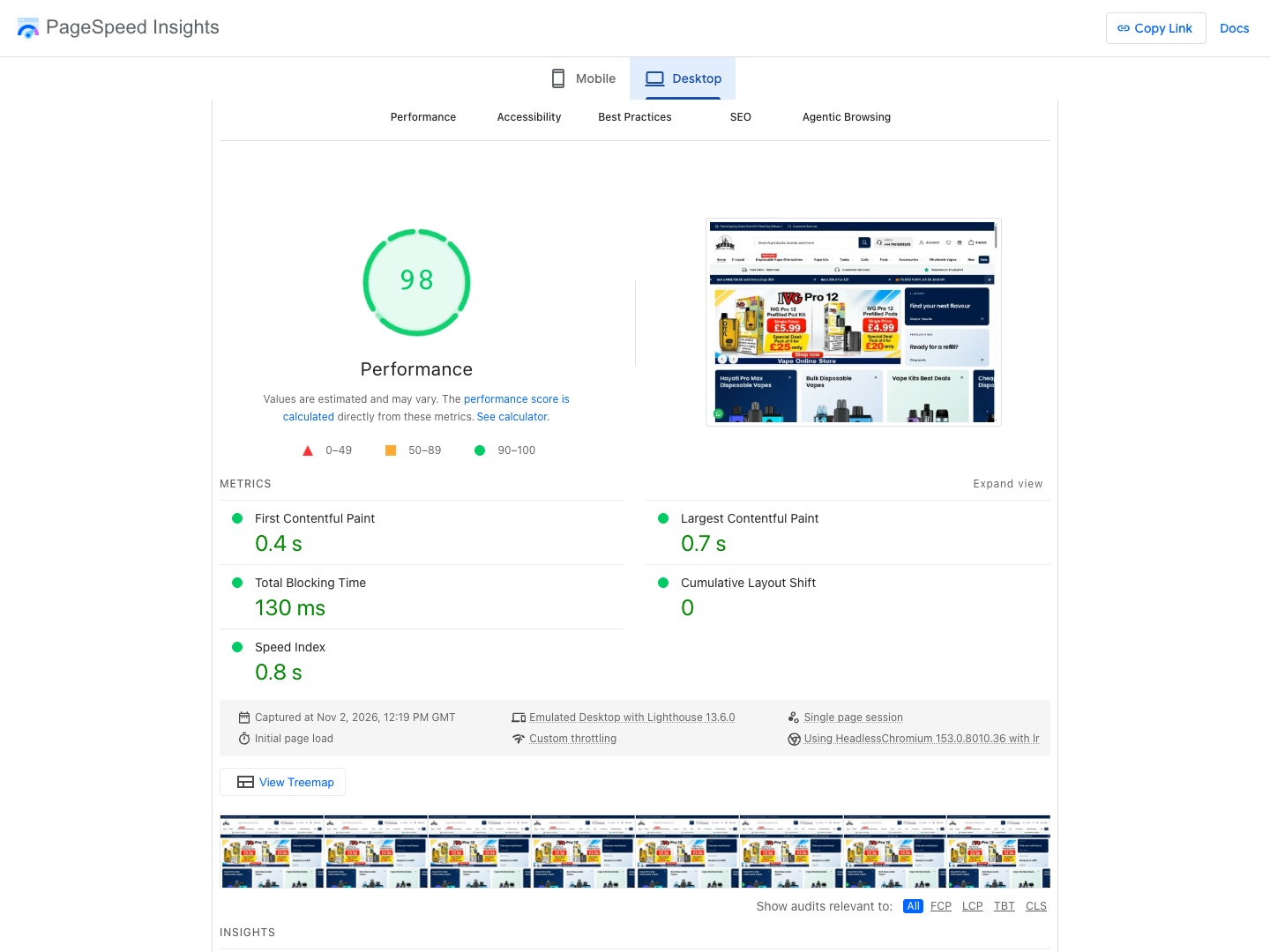
- 98 in the same Google report
- Progress during the work
- Into the 70s after the early rebuild and cleanup; saved 77 on 28 October, then four results of 83–86 on 29 October
- Current URL field data
- Core Web Vitals passed: LCP 1.9 s, INP 144 ms, CLS 0
- Scope
- Theme refurbishment and performance work; the headline scores describe the homepage
Vape Online Store sells vape products to retail and wholesale customers in the UK. Its Shopify store started in the mid-40s on mobile, according to the project owner. It had a heavily customised theme, large documents, inconsistent loading and inherited code that suppressed scripts for certain test-like browsers. Reaching the 70s was already a substantial first stage of the project.
The saved 77-point result came after the rebuild and earlier performance work. It marks progress already made. The full case runs from that reported mid-40s starting point through the early recovery, the stubborn 70s plateau and the final verified 92. It is an example of our Shopify optimisation work across implementation and verification.
The starting point and the first gains
The inherited theme contained code that changed its loading behaviour for certain browser and platform signatures. Matching browsers had scripts suppressed and received a lighter page than ordinary shoppers. Archived source and controlled browser tests reproduced the difference.
We rebuilt the storefront on a current theme foundation and removed that test-dependent behaviour. Useful store content, merchandising and shopping features were carried forward with deliberate SEO repairs. The new loading rules use page paint and visitor interaction consistently.
Before the saved 77-point run, the speed work had already improved product-image discovery, repaired a body-layout defect that moved content during parsing, stabilised collection content, corrected phone image sizing and brought the first banner request forward. Off-screen image loading and optional widgets also received attention. Those changes belong in the result, alongside the later work that broke through the plateau.
The original mid-40s report was not retained; that starting point and the early move into the 70s come from the project owner's account. The archived code, releases and retained Google reports document the work and later checkpoints.
The first image was competing with the rest of the page
The first banner needed to start early and finish promptly. We corrected its discovery path, checked the selected responsive image and used the theme's native preload mechanism. Phone artwork was sized for its actual role instead of offering unnecessarily large candidates.
That still left a queue of competing downloads. Cards below the fold, later carousel slides and category images could start while the banner was loading. Browser-native lazy loading did not keep every off-screen image out of that window.
A costly double-download defect
One image-release routine could run before the document and card layout were ready. The browser selected wide image candidates, then downloaded smaller versions once it knew the cards' dimensions. In affected tests, roughly 100 card images fetched a 940-pixel version and then a 330-pixel version.
We made release wait for parsing and layout, kept non-rendered images held, and prevented phone hover images from joining the initial load. Desktop hover behaviour remained available. The affected preview loads fell from about 10.9–11.1 MB to 5.2–5.4 MB. That was a specific defect repair, not a claim that every page became half the size.
Changing what loaded before the banner painted
A script marked defer can still download while the main image is loading. It executes later, but its network request can compete for the same connection. On this homepage, changing execution timing alone left too much work in the initial loading window.
Eligible theme scripts and already-asynchronous stylesheets were scheduled after the first banner painted, with interaction and timed fallbacks. Repeated script URLs were loaded once. Critical presentation and the theme editor retained their required loading paths.
Optional chat, popup, push and loyalty widgets were released on interaction. The homepage review carousel received a separate readiness check before its loader was delayed; product review loading retained its existing behaviour. Consent, commerce and analytics were not put behind a blanket delay.
The failed release trigger that changed the approach
An early version used window load as a fallback. Some Google runs painted late enough that this trigger started theme downloads just before the first paint, putting them back into the window we were trying to clear. Those runs scored in the 60s.
We removed that trigger and retested. A later homepage review-loader change was followed by four Google mobile results of 85, 86, 83 and 84. The affected navigation, carousels, quick-add and drawer flows passed the recorded Chrome, WebKit and desktop checks.
The technical SEO pass found more HTML work
The final audit also exposed substantial repeated markup. Filters, gallery controls and card loaders carried copies of the same SVG geometry. Large text filters rendered duplicate fallback lists. A sampled product's structured data included extensive formatting around hundreds of offers.
- Gallery and filter geometry: shared SVG definitions reduced sampled collection and large-product documents by about 317 KB and 449 KB respectively, while retaining the image elements and controls.
- Product structured data: JSON-LD fell from 334,589 to 210,582 bytes, with every parsed field and all 224 offers retained.
- Native filter fallbacks: one list served JavaScript and no-JavaScript visitors, removing about 214 KB of further collection HTML and fixing duplicate input IDs and label clicks.
- Cart-calculator output: the country list matched the store's shipping destinations instead of rendering all 239 countries and province data on every page.
These are reductions in decoded HTML. Repeated markup compresses well, so the download savings were smaller. The work also reduced repeated parsing and repaired real controls. Filter selection, gallery zoom, variants, quick-add and no-JavaScript behaviour were checked on the affected templates.
This is where technical ecommerce SEO and performance share the same source: the rendered page can be clearer for browsers, shoppers and crawlers without removing useful content.
What the results establish
| Google mobile capture | Performance | Lab LCP |
|---|---|---|
| Project start, owner-reported | Mid-40s | Original report not retained |
| 28 October 2026, after substantial earlier work | 77 | 4.75 s |
| 29 October 2026, four runs | 85 / 86 / 83 / 84 | 3.68–4.13 s |
| 2 November 2026 | 92 | 3.23 s |
The latest mobile report also records 1.4-second First Contentful Paint, 30 milliseconds of displayed Total Blocking Time and virtually zero layout shift. Desktop performance is 98, with a 0.7-second lab LCP.
The original Google report is available for Vape Online Store on mobile and desktop. The screenshots below show that existing 2 November report.
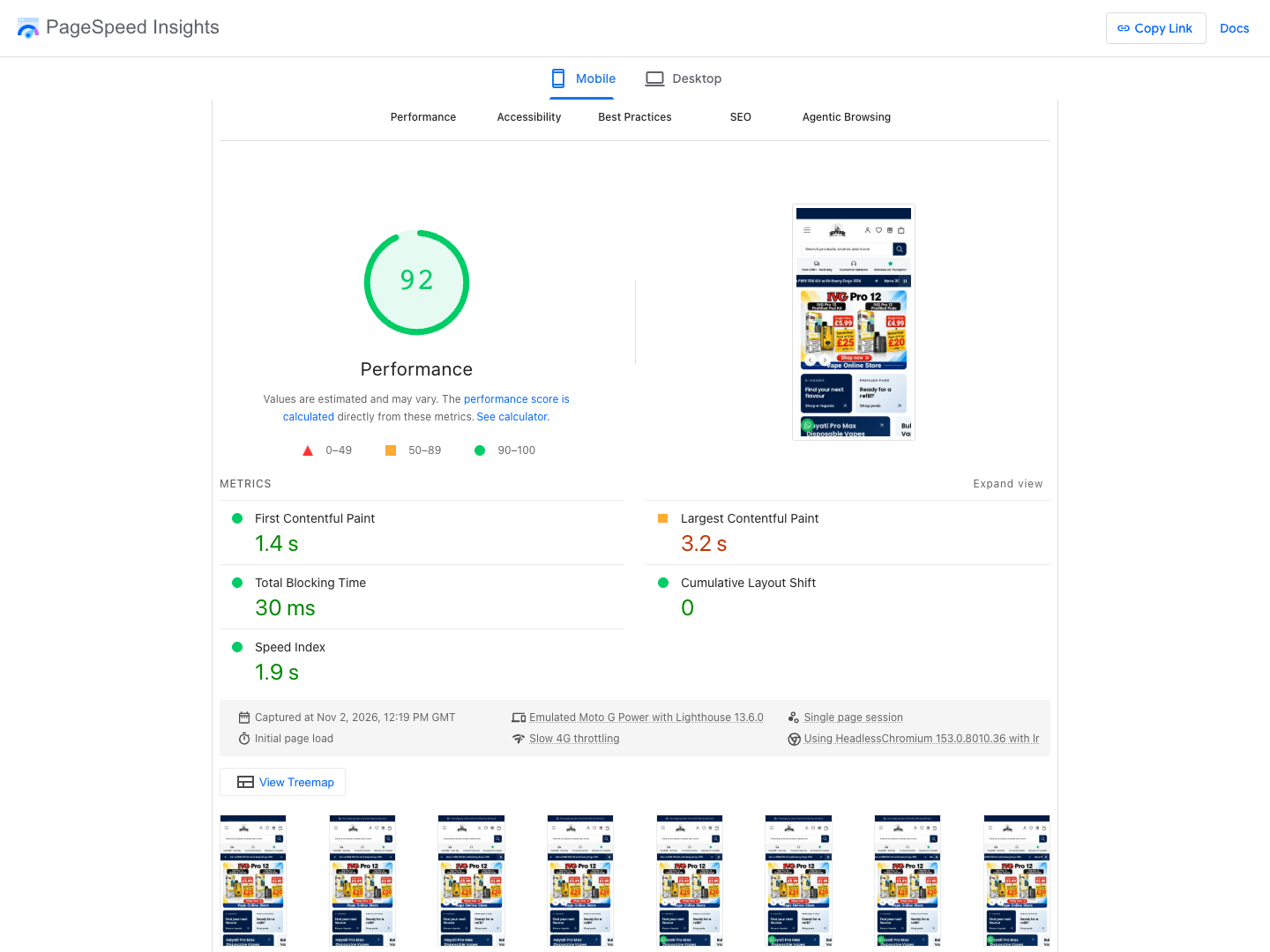
The final step has more than one contributing condition. The client changed the first banner after the technical fixes; its selected image resource was about 40% smaller than in the earlier saved run. Test environments and the Lighthouse version changed too. We can substantiate the accumulated engineering work and the later result, without assigning every score point to the final HTML batch.
Fourteen recovered Google mobile reports, archived source and dated browser checks form the evidence record. Only one unique 90-plus report was recovered for this case. The scores describe the homepage; third-party app defects and whole-store acceptance remain separate from the initial-load result. No conversion, revenue or ranking uplift is claimed.
For the measurement method, see Google's PageSpeed lab and field documentation and our Core Web Vitals guide for Shopify.
Shopify speed optimisation: common questions
How can you improve Shopify mobile speed after basic image compression?
Inspect the main image's discovery, download and paint timing, then check what else starts in that interval. On this project, duplicate responsive downloads, off-screen images, theme assets and optional widgets all needed attention. The useful fix depends on the current page, not a standard app-removal list.
Does a 90-plus PageSpeed score mean Core Web Vitals pass?
No. The performance score is a lab result for that page and run. Core Web Vitals use real-user loading, interaction and stability data. Read both panels and keep the page, device and time window clear.
Should every Shopify app be delayed?
No. Decide by function and dependency. A popup can appear after interaction; a price, discount, consent control or cart action may need to work immediately. Check the first interaction and widget readiness as well as the initial load.
Can Hollow Point guarantee the same score on another store?
No. This result belongs to a dated page, content set and measurement. Another store needs its own baseline, dependency review and representative browser checks before the work can be scoped.
NEXT STEP / HOLLOW POINT
Is your Shopify store stuck in the 60s or 70s?
Bring the live page and recent mobile reports. We can assess the loading path, theme and app dependencies, then scope the fixes and checks the store needs.